Core / Pillar 26 min read Published Updated
What Is ChatGPT Search? (2026 Guide)
I use ChatGPT Search every week as an AEO practitioner, and I still see teams mix workspace search with live web retrieval. This is how I describe the product, the citation path, and the retrieval behavior I actually watch.
On this page
- What ChatGPT Search Is (And What It Is Not)
- ChatGPT Web Search Explained: How Retrieval Works
- How ChatGPT Search Cites the Web
- Who Can Use ChatGPT Search, and From Where
- How I Trigger Web Search Inside a Chat
- Search, Deep Research, and the Rest of the Conversation
- What ChatGPT Search Means for Brands That Want Citations
- How I Audit Whether a Brand Can Appear in ChatGPT Search
- Field Notes I Keep Coming Back To
- 01
I treat ChatGPT Search in 2026 as two surfaces: sidebar workspace search and live web search inside a conversation.
- 02
Web search is documented across major ChatGPT tiers and for people who are not signed in, with usage still bounded by each plan.
- 03
When ChatGPT uses the web, I look for the globe icon and click citation links rather than treating the reply as an unsourced summary.
- 04
I start a web pass with the tool picker, the slash command, or regenerate → Search the web, then reshape the retrieved facts in follow-ups.
What ChatGPT Search Is (And What It Is Not)
ChatGPT Search is not one retrieval surface, even though the product name suggests it. I treat it as two: a workspace search that finds content already inside a ChatGPT account, and a web search that pulls live external pages into a conversation. When someone asks me what is ChatGPT Search, I start there. For the wider category, I keep our guide to what is ai search open. For more, see what is llms.txt. For more, see GEO vs SEO. For more, see brand not showing in chatgpt.
The Unified Workspace Search in the Sidebar
The sidebar search I use most days is internal, not web. OpenAI’s 2026-09-14 release notes describe a unified search that runs from the sidebar on web, iOS, and Android and returns matches across past chats, projects, images, and documents inside a ChatGPT workspace. I can filter results by content type before opening the selected item inside ChatGPT. In a client audit, that surface tells me what a ChatGPT account already holds: saved threads, uploaded files, or generated images. It does not tell me whether a public URL can be retrieved from the open web. I log those two findings in separate columns. A project file hit is a workspace match; a source link in a reply is a different artifact. The release notes call this unified search, and that word is useful because it collapses several object types into one query. When I audit, I still break those object types apart, because a document match and an image match answer different questions. That is the distinction I lead with when someone asks what is ChatGPT Search.
The Web Search That Lands Inside a Conversation
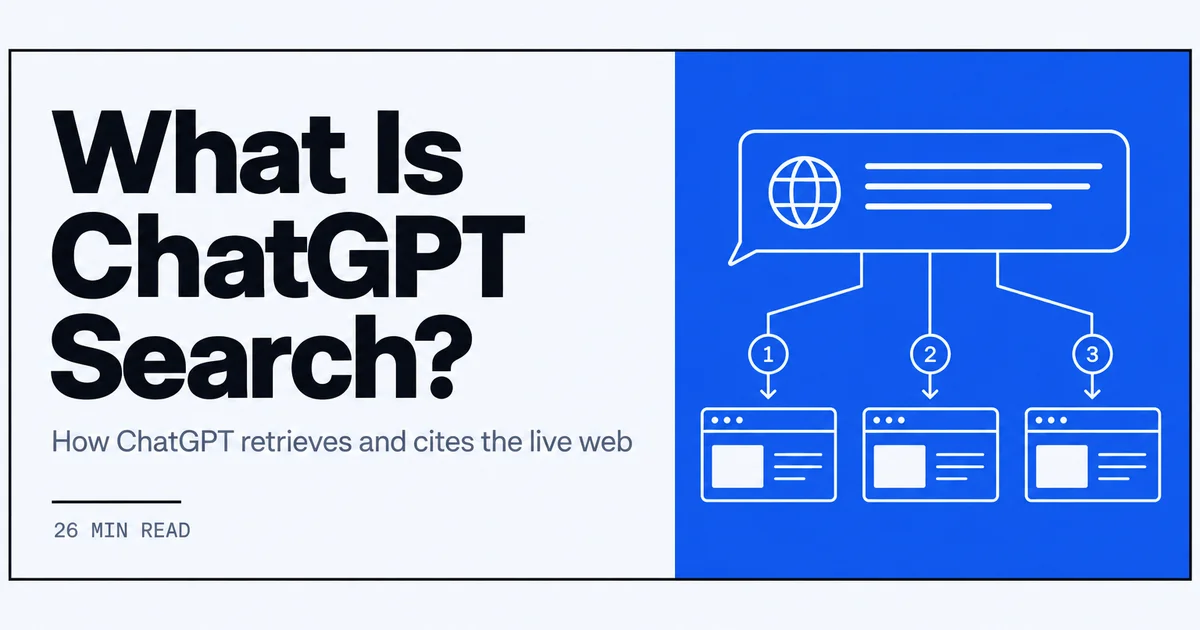
The second surface is the one this article is really about. It starts when ChatGPT decides that a question needs current or detailed information, or when I select Search manually, and it runs as a live retrieval pass against the open web. I do not get a results page. I get a conversational reply that can include inline source links, and the source URLs are the part I audit. OpenAI’s ChatGPT Search help article describes web search on chatgpt.com, desktop, and mobile apps. For brand work, this is the surface that can turn a public page into a cited source. I keep it separate from the sidebar because the inputs and evidence are different. One searches what an account already contains; the other asks for pages the model may never have seen. That distinction matters once a team shows me a chat and asks whether their page appeared. This is the surface most people mean when they ask what is ChatGPT Search.
Why I Keep the Two Surfaces Apart in Audits
I keep the two surfaces apart in audits because mixing them produces loose notes. Workspace search reports what a ChatGPT account already contains. Web search reports what the model pulled from the live web during one conversation. The permissions differ, the source list differs, and the citation behavior differs. If someone shows me a chat where ChatGPT found an internal project file, that is not evidence that a public page is retrievable from the web. If the same thread later cites an external URL, I record that as a second observation. The 2026-09-14 release notes describe the unified workspace search; the web search documentation describes a different mechanism. I treat them as two records inside the same product, not as one interchangeable feature. That is also why I never tell a brand team that a workspace hit is a citation. A citation requires the live web pass, a globe icon, and a source link in the reply. Three conditions, checked in order.
Video: The ultimate guide to AEO: How to get ChatGPT to recommend your product | Ethan Smith (Graphite) · Lenny's Podcast
ChatGPT Web Search Explained: How Retrieval Works
When I need ChatGPT web search explained, I usually draw the same picture: the model does not open a separate results page; it performs a retrieval pass inside the conversation. The pass sits between the query and the sourced reply, and it leaves two visible traces, the globe icon and inline citation links. For teams optimizing pages for that path, I point to what is generative engine optimization in 2026 and then walk through what I watch.
When a Question Needs the Open Web
I do not force web search on every prompt. OpenAI’s Academy article on Search and Deep Research describes ChatGPT Search as allowing ChatGPT to pull the latest information from the internet directly into conversations for questions that require current or detailed information. That framing matches what I watch in client work: current events, pricing that changes often, rollout dates, local availability, and “as of today” prompts are the ones where I expect a web pass. If the question is purely generative, I treat search as unnecessary. If I need a sourced reply, I select the Web Search tool manually or phrase the prompt so the information need is explicit. The choice is not hidden; it is in the question. That keeps my audit query set focused on prompts where a citation is a reasonable outcome. That trigger set is the practical answer to what is ChatGPT Search.
What I Watch Between the Query and the Cited Reply
After I send a prompt with web search, I watch for a short delay before a paragraph of answer appears with a globe icon next to it. I do not see the intermediate search engine results, the ranking logic, or the full set of pages ChatGPT considered. I see only the final reply and the citation links it surfaces. In an audit, I treat that reply as a quote layer over retrieved pages: the model has already compressed several sources, and my job is to reopen those sources and compare. If I ask a follow-up in the same thread, the next pass may run again or reuse context. I note that because a follow-up answer about one brand can be built on a new retrieval, not the original page list. The retrieval pass is not a static report; it is an event inside the thread. My notes therefore record the prompt, the timestamp, and the first output, then each follow-up separately. That is the only way I can tell which source belongs to which answer. That sequence is ChatGPT web search explained as an event, not a static page.
How This Retrieval Differs From a Results Page
A classic search results page gives me a list I can scan by position. ChatGPT’s output is not that. I get a composed answer with claims embedded in sentences and citation anchors attached to passages. When a page is cited, it appears as support for a specific statement, not as position four in a fixed list. That changes what I record: instead of ranks, I log cited passages. If a team asks “did we rank for this query,” I explain that the question does not map cleanly onto ChatGPT’s behavior. The answer may cite a page for one sentence, quote another, or skip both. My field notes therefore capture evidence at passage level, not a ten-blue-links slot. That distinction matters most when a brand is cited without a visible link and the team wants a rank position. I repeat that a citation is not a rank.
How ChatGPT Search Cites the Web
Citations are the part of ChatGPT Search I audit most closely. A cited reply gives me two artifacts: the passage the model generated and the external source it attached. OpenAI’s Academy guide describes a globe icon next to the response and clickable citation links in the answer. I follow both, and I compare the pattern with other answer surfaces such as what is google ai mode in 2026.
The Globe Icon and Inline Citation Links
When ChatGPT uses web search, the globe icon appears next to the model’s response. That is the signal I look for before treating the answer as a retrieved result. The inline citation links can sit within or below the sentences; they are not always a numbered footnote block. I record the icon, the link placement, and the URL for every prompt. In a verification run, that gives me a repeatable record: if the globe icon is absent, I stop and treat the answer as non-web. If the icon is present but no source link is visible, I note that too. OpenAI’s Academy guide says users can click citation links in the answer to review the original external sources, which is exactly the path I follow during audits. I do not treat the globe icon as proof that a specific page was quoted; I treat it as a signal that a web pass happened. The link is the part that connects a claim to a source. That icon-plus-link pattern is the visible part of what is ChatGPT Search.
Opening the Original Source From an Answer
When I click one of those citation links, the destination is the external page, not a ChatGPT copy of it. I compare the claim in the answer with the actual text on the page, including headings, numbers, and dates. If the page has changed since retrieval, I record the difference as a freshness gap, not as evidence of any intent by the publisher. I also watch for redirects and access errors in the browser. Those are observable conditions in my notes. The point is not to judge a site from the snippet; it is to reopen the original source and verify the sentence that triggered the citation. I repeat this for every cited URL in a run, even when the cited brand is the same across prompts. That consistency check often reveals whether a page is being cited for one claim or many. I write down the passage text, not just the URL, because the same domain can support different statements. This source check is part of what is ChatGPT Search when I do audit work.
How I Compare These Citations With Other Answer Engines
Different answer surfaces show sources in different places, and I keep a short checklist. In my 2026 tests, ChatGPT places links within or below the reply with a globe icon; Perplexity often puts numbered source tiles above the answer; Google AI Mode surfaces expandable source chips. I do not rank one presentation as better. I record which pattern lets me trace a claim back to a page fastest. That is a task-level comparison, not a verdict on any product. When I audit ChatGPT, I check whether the link sits at sentence level or paragraph level, because that changes how I explain the citation to a brand team. A sentence-level link is evidence about a narrow claim; a paragraph-level link needs more reading before I attribute anything. Those notes go into the same log as the URL and the passage.
Who Can Use ChatGPT Search, and From Where
When I get asked who can actually run ChatGPT Search, I split the answer into three checks: account tier, device surface, and plan ceiling. The OpenAI help page I keep open for this was updated September 7, 2026, and it is where I point people before they assume a missing button means they do not have access.
Every Major Tier, Plus People Who Are Not Signed In
According to the ChatGPT Search help article dated September 7, 2026, web search is not limited to a single paid tier. The same documentation lists Free, Go, Plus, Pro, Business, Enterprise, and Edu, and it also states that people who are not signed in can use the feature. In audits, I treat that unsigned-in group as its own access path because the entry point looks different, even though the search mechanics are the same after the prompt is sent. When a client asks whether their team has access, I check the plan first and then ask which of those account types they actually sign in with. Access and the number of usable searches are two separate questions in my notes, and I try to record both before the first test prompt. This access split is a common way to ask what is ChatGPT Search at the account level.
chatgpt.com, Desktop, and the Mobile Apps
I run live web searches from the three places I usually have open during a client audit: chatgpt.com in a browser, the desktop app, and the mobile app. The September 7, 2026 Search documentation names the same surfaces, so I no longer treat the capability as browser-only. In practice, the button layout changes slightly between those surfaces, but the retrieval behavior I watch for is consistent: a question that needs current information can be sent with Search selected, and the reply can carry a globe icon and citation links. I still re-run prompts on at least two of those surfaces when I need to compare how the same query resolves, because the interface around the answer differs even when the cited sources are the same. My cross-device check is ChatGPT web search explained as a testing process.
Plan Limits as the Practical Ceiling
When I log account setups for an audit, I separate two things: whether Search appears as a tool, and how many searches that plan can consume before hitting a ceiling. The 2026-09-07 ChatGPT Search article states that usage is constrained by each plan’s limits, which matches what I see in the field: the tool is there, but the practical budget changes across tiers. I have stopped reading plan limits as a feature gap. They are the ceiling that determines how many repeated prompts I can run without switching to another account or another day. That is why my audit logs always include the tier and the device in the same row as the prompt. If a brand says they cannot see Search, I first ask whether they are signed in at all, then whether they are inside a plan with a spent budget, because those two cases look similar at the button level but mean very different things. A plan ceiling is one of the first constraints I explain when someone asks what is ChatGPT Search in a team setting.
How I Trigger Web Search Inside a Chat
I trigger Search manually far more often than I wait for the model to decide. That is because the current-info prompts I care about are exactly the ones where I want an explicit web pass, not a guess from memory. The documented paths are simple enough to run in a client session without changing the conversation.
View All Tools, Search, and the Slash Command
My default path is the one described in the ChatGPT Search help article: open a conversation, select “View all tools,” choose “Search,” enter the question, and send. I use that when I need to make the web pass visible before the answer arrives, especially with a client watching the screen. The faster route is the slash command. I type “/” in the composer and select “Search” from the menu that appears. In my notes, both paths start the same retrieval pass; the difference is only in how much of the selection is visible in the interface. I usually take the tool picker in the first prompt of an audit and the slash command for every follow-up after that. The important part for me is that I chose Search, not that the model guessed it. The manual selection is the part of what is ChatGPT Search I can control.
Regenerating an Answer With Search the Web
On an existing reply, I often do not delete and retype the prompt. The 2026-09-07 ChatGPT Search article says I can use the refresh control and choose “Try again” or “Search the web” when those options are available. I use that path when I sent a current-events question without forcing Search, and the first answer came back with no globe icon or citation links. Regenerating with “Search the web” keeps the same thread context but adds the retrieval pass I should have requested in the first place. I also log which option I used, because “Try again” and “Search the web” are not the same test condition. One may reuse the same response path; the other explicitly requests a web pass. That regeneration option is another way to answer what is ChatGPT Search when the first reply misses the web.
Follow-Ups That Transform What Search Just Retrieved
Once Search returns a sourced answer, I treat the next prompt as a separate task. I rarely stop at the retrieved passage. I ask ChatGPT to summarize the sources into a brief, recast the cited facts into a stakeholder update, or draft an email from the retrieved information. That follow-up is where the actionable output gets made. It is also where I watch for drift: if I ask for a rewrite without forcing Search again, the model may smooth the language and drop the citation links. I keep the cited answer open in the thread while I work from it, and I only run an explicit new Search if I need the retrieval refreshed. The follow-up is not the search; it is the use I make of the search.
Search, Deep Research, and the Rest of the Conversation
I keep Search and Deep Research as separate tool types in my head, even though they live in the same conversation. The Academy guide I use for this distinction frames Search as the retrieval step that pulls current web information into a thread, while the follow-up prompts do the synthesis work. That framing matches how I audit a brand.
What OpenAI Academy Says Search Is For
The OpenAI Academy article on Search and Deep Research, published April 10, 2026, describes ChatGPT Search as a way for ChatGPT to pull the latest information from the internet directly into conversations for questions that require current or detailed information. I keep that definition pinned in my audit template because it tells me which prompts belong in a web-search test: live facts, recent changes, or detail that a training snapshot is not built to answer. It also tells me which prompts should not be in that test. A brand-history question that only needs stable facts may not require an explicit web pass, and forcing one does not make the answer more authoritative. I use the Academy wording as the test trigger, not as a claim about how the model works internally. That definition is the closest official answer to what is ChatGPT Search.
Turning Retrieved Pages Into Summaries and Drafts
After a web pass, I use the same thread to turn retrieved pages into output. The same Academy guide points to follow-up prompts that transform retrieved information, such as summarizing or drafting emails, and that is exactly the step I spend the most time on. I might paste a list of cited links into my own notes, then ask ChatGPT to summarize the sources in three bullets, recast the facts for a customer support reply, or draft a short brief from the retrieved pages. I keep all of that inside the same conversation so the citations remain in context. The draft is only as useful as the web pass it is built on, so I do not separate the drafting step from the retrieval step when I am evaluating whether a brand appeared well. This workflow is ChatGPT web search explained from retrieval to drafted output.
Why I Still Treat Search as One Step, Not the Whole Job
Search is the step that gets current web information into the thread; it is not the outline, the analysis, or the final draft. I still see teams judge a search result as if the first sourced answer were the finished deliverable, and that misses the workflow. In my own process, I note the retrieval pass first: which sources appeared, which passages were cited, and whether the globe icon was present. Then I write a separate note for the synthesis pass: what I asked ChatGPT to do with those passages, and whether the answer stayed close enough to the sources to be usable. Keeping those two passes apart is what lets me debug a bad output. If the retrieval was right but the draft was weak, I change the follow-up prompt. If the retrieval was wrong, no amount of rewriting in the same thread fixes it.
What ChatGPT Search Means for Brands That Want Citations
When I audit a brand for ChatGPT Search, I am not looking for a ranked position. I am recording whether a page can be retrieved from the live web, which passage gets cited, and how cleanly that passage can be quoted. Those three observations drive most of the page-level work I recommend.
Pages Have to Be Retrievable Before They Can Be Cited
A page has to enter the retrieval pass before it can appear as a source. In practice, I check that the URL resolves, returns readable HTML, and is reachable from a normal browser fetch. If the page sits behind a login, returns a soft-404, is blocked by robots directives, or exists only in an orphaned section with no internal path from a crawlable start, I treat it as unretrievable until I can fetch it directly. The ChatGPT Search help article says web search runs across chatgpt.com, desktop, and mobile apps, but it does not promise every page will be retrieved. I also check the canonical version, because duplicate or thin versions make the retrieval path less stable. I never assume a page is eligible just because it exists. That fetch check is the first step in what is ChatGPT Search for a page I want cited.
Citation Is a Passage Event, Not a Rank Position
When ChatGPT uses web search, the globe icon appears next to the response, and inline citation links point back to original sources. I log the exact sentence that carries the citation, not the domain alone. A brand can be cited for one narrow claim while dozens of other pages from the same site never surface. That is normal in my audits. The OpenAI Academy Search and Deep Research guide describes clicking citation links to review the original external sources, and I follow that step each time. I record the passage as the unit of evidence: the source URL, the surrounding sentence, and whether the cited line answers the prompt directly. A follow-up prompt can rephrase and drop the link without changing the page's retrievability, so I do not treat one citation as a stable position. That passage-level behavior is ChatGPT web search explained for a brand team.
How I Phrase Claims So a Model Can Quote Them Cleanly
I phrase high-value claims so they can be lifted without a model having to infer or compress too much. A clean quotable line is self-contained, names the thing it describes, and carries its own qualifier. For example, I prefer “ChatGPT Search supports manual web search on chatgpt.com, desktop, and mobile apps” over a vaguer “it is available everywhere.” I keep a short definitional sentence near the top of a page, not buried in a disclaimer. I put one fact per paragraph where possible, and I avoid framing a claim as a comparison unless the page states the basis for that comparison. When I want a citation, I make sure the page says the thing the answer would need to quote, rather than leaving it for the model to reconstruct. I also test the quoted line directly by asking a focused question and checking whether the reply returns the same phrasing.
How I Audit Whether a Brand Can Appear in ChatGPT Search
My audit starts before I open a client URL. I run a small set of current-information prompts, force web search, and log what comes back. Then I repeat the prompts across surfaces to see how stable the citations are.
Queries I Run Before I Look at a Single Page
I send prompts that need fresh, specific information, not evergreen brand descriptions. Examples I use in field notes include: “What did [brand] announce this week?”, “What is the current pricing for [product] as of 2026?”, and “What does [company] say about [recent change]?” I also run comparison and how-to prompts where the answer should cite multiple sources. Before each prompt, I open the tools picker and select Search, or type “/” and choose Search, so retrieval is explicit. This matters because an uncited answer may be drawing on the model's existing knowledge rather than a live web pass. I do not prep the brand page beforehand; I want to see what the retrieval surface returns without me steering it. I keep the query set small so I can repeat it across accounts and devices without hitting plan limits too quickly. Those prompts are where what is ChatGPT Search gets tested against the live web.
What I Record When a URL Is Cited or Skipped
For each prompt I record the full prompt, date, tier, device, and whether the globe icon was present. When a source is cited, I copy the exact URL, the cited passage, and the sentence in the answer that carries the link. I also click the citation once to confirm the external page resolves to the same content. When a brand URL is skipped, I note what was cited instead and whether the question was phrased broadly. I keep skipped and cited cases in the same sheet because retrieval can vary between repeats, and a single miss is not enough evidence to change a page. I also record the source order in the reply, because I have seen citation positions shift without the underlying pages changing. This gives me a repeatable record of passage events rather than a single “is the brand visible?” judgment.
Repeating the Same Prompt Across Tiers and Devices
I rerun the same prompt on chatgpt.com, the desktop app, and a mobile app when my plan allows. I also test while signed out where the product supports it, since OpenAI's ChatGPT Search documentation says web search is available across Free, Go, Plus, Pro, Business, Enterprise, and Edu tiers as well as to people who are not signed in. I do not treat tier availability as a guarantee of identical sources; plan limits can cap how many searches I can run. I also repeat the prompts on separate days because retrieval order shifts. Differences between surfaces show up in my notes, so I record the environment next to each citation. If a URL appears on desktop but not mobile, I treat that as a variability signal, not a final verdict about the page's retrievability.
Field Notes I Keep Coming Back To
These are the three distinctions I restate in almost every audit, because they change what a team should fix first. They separate live retrieval from stored knowledge, passage evidence from domain authority, and explicit web passes from uncited answers.
Search Is Not the Same as Being in the Training Cutoff
Live web search is not the same as a page being in the model's training data. A page dated after a training cutoff can still appear as a citation if it is retrieved in a live pass; a page the model already knows can still fail to be cited if the current question does not trigger retrieval. The Academy guide describes ChatGPT Search as pulling the latest information from the internet into conversations for questions that require current or detailed information. When I see a press release from the current month cited, that tells me retrieval happened live; the same page may not have been in training. I therefore do not ask whether a brand was “trained on.” I ask whether the current version of the page is fetchable and whether it states the answer in a form the model can cite.
A Cited Domain Is Not a Sitewide Vote
A citation is evidence about the passage that was retrieved, not a statement about the whole domain. I have seen one help-center article get cited while the homepage and product pages from the same site never appear, and the reverse. That pattern stops me from treating a domain as “optimized for ChatGPT” after one source shows up. In my notes, each citation is tied to its URL and quoted text. I do not summarize a brand as cited or not cited at the domain level, because the answer engine decides per passage, and the same domain can be skipped on a slightly different prompt. I track repeated prompts and note that one page cited for a long-tail how-to does not mean the homepage will appear for a branded navigational prompt. This is the difference between a domain-level vote and a passage-level event. This is ChatGPT web search explained at the citation level.
Freshness Questions Still Need an Explicit Web Pass
When I need a current fact, I do not accept an uncited reply at face value. I explicitly run Search, either by choosing it from View all tools, typing “/” in the composer, or regenerating an answer with “Search the web.” That step matters because a conversational reply without a globe icon may be answering from existing knowledge, and I want the live retrieval pass visible. I also note when the answer cites a source but the source page is older than the event I asked about. In those cases I rerun the prompt with the date included and compare. If I forced Search and the answer still carries no inline citation, I do not treat that reply as evidence of a live web pass. Freshness is only useful to me if the model actually performed a web pass and the cited page supports the claim. That is the field-level version of what is ChatGPT Search.
Frequently asked
ChatGPT Search is OpenAI’s web search feature: it pulls current information from the internet into a conversation when a question needs fresh or detailed context. It is not the same as the separate 2026-09-14 sidebar search that finds your own past chats, projects, images, and documents inside ChatGPT.
OpenAI’s 2026-09-07 help article describes web search as available on Free, Go, Plus, Pro, Business, Enterprise, and Edu, and to signed-out users. It works on chatgpt.com and the desktop and mobile apps, within plan limits. The Academy guide says it pulls latest internet information into conversations.
Yes. OpenAI’s September 2026 help article states web search can be used by people who are not signed in, in addition to Free, Go, Plus, Pro, Business, Enterprise, and Edu. It is available from chatgpt.com and the desktop and mobile apps.
In the composer, open “View all tools,” select “Search,” then enter and send your question; typing “/” and choosing “Search” also works. To regenerate an existing answer, use the refresh control and choose “Try again” or “Search the web” when those options appear.
When ChatGPT uses web search, a globe icon appears next to the model’s response as a signal that internet results informed the answer. Citation links within the response can be clicked to open the original external sources, so you can review where the information came from.
The core web search feature is available across Free, Go, Plus, Pro, Business, Enterprise, and Edu, and it can be run from chatgpt.com and the desktop and mobile apps. Each plan’s usage limits constrain how much search you can run, so the experience is not identical across tiers.
