Core / Pillar 24 min read Published Updated
What Is Google AI Mode? (2026 Guide)
I keep this guide on my desk because AI Mode is the Search surface I now test first. Query fan-out, not a chatbot skin, is what changed my work after I/O 2026.
On this page
- How I define Google AI Mode after I/O 2026
- Query fan-out inside Google AI Mode
- Where AI Mode and AI Overviews diverge
- How the 2026 Search redesign routes people into AI Mode
- Images, files, videos, and Chrome tabs as inputs
- Gemini 3.5 Flash as the default in AI Mode
- Citations and source selection in AI Mode answers
- Google AI Mode explained for AEO work
- What I measure when a brand wants AI Mode visibility
- Scale and the global Search rollout
- 01
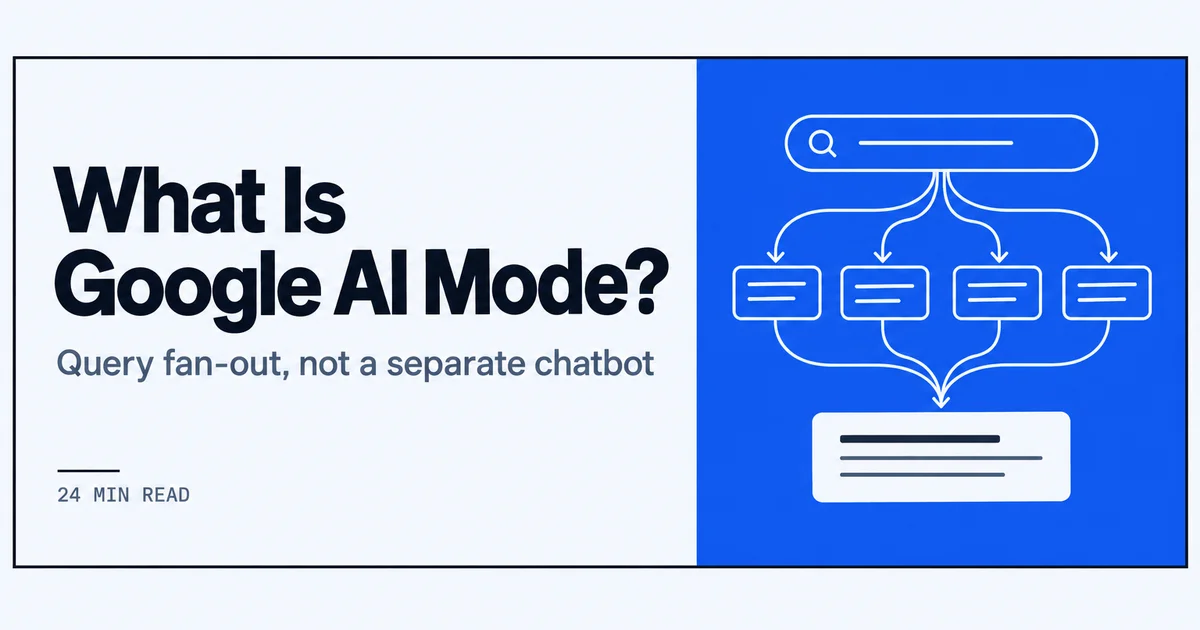
I treat Google AI Mode as a deeper Search session built on query fan-out, not as a separate chatbot product.
- 02
AI Overviews can hand a user into AI Mode through follow-ups; I test both surfaces, and I do not treat them as interchangeable.
- 03
After May 19, 2026 I re-test prompts because Gemini 3.5 Flash became the global default and inputs now include files, images, videos, and Chrome tabs.
- 04
The work that moves my citation logs is covering fan-out subqueries with clear, citable pages rather than chasing a single head term.
How I define Google AI Mode after I/O 2026
I used to explain Google AI Mode as a panel. After Google’s I/O 2026 announcements, I stopped; the framing changed enough that my old definition no longer matches what I test. The piece below is the definition I use when a brand asks me what is Google AI Mode at the start of a project. It covers Google’s stated description, where the surface sits on a results page, and why I do not treat it as a separate chatbot. I keep it short because the rest of the guide depends on one shift: AI Mode is a Search redesign behavior, not an app I log into separately. That practical definition of what is google ai mode is what I use for the rest of the guide. For more, see what is chatgpt shopping. For more, see How to Track AI Search Traffic in GA4.
Google's own framing in 2026
Google’s I/O 2026 roundup describes AI Mode as its most powerful AI Search experience. The same announcement says AI Mode has surpassed 1 billion monthly users. I treat both statements as framing, not as a checklist. The user figure tells me the surface is large enough that brand visibility questions I get now include AI Mode by default; the “most powerful” phrasing tells me Google positions this as the deepest version of its AI results, not a side experiment. When I re-test pages after a Search update, those two lines are the context I put at the top of my notes. They do not tell me which URL will be named, how many citations a prompt will surface, or why one page type wins over another. They only tell me the surface Google considers central. The page-level work still starts the same way: I look at how a question becomes subqueries, then I check which of my URLs those subqueries pull in.
What is Google AI Mode on a results page
On a results page, AI Mode sits as the Search surface I choose when a classic ten-blue-link layout is not enough. The classic layout still exists; AI Mode is the expanded answer layer that can absorb the page, take a long prompt or an attachment, and answer with sources over multiple turns. I describe it to clients as the difference between scanning a list and asking a follow-up inside the result. AI Overviews are the shorter summary layer that can appear above the classic results; AI Mode is the deeper session layer. For readers who want the adjacent surface, I keep a short guide on what are google ai overviews in 2026. The practical distinction I use: an AI Overview is often a one-shot snapshot, AI Mode is where the same query can keep expanding without me re-running a new search. That on-page difference is the google ai mode explained I give in one sentence.
Why I treat it as Search, not a chatbot
Google’s May 19, 2026 Search update frames AI Mode as part of a broader Search redesign rather than a standalone product. That wording matters to my work because it changes the entry paths. People do not need to open a separate chatbot app; they can arrive from the search box, from follow-up questions, or from an attachment. I treat AI Mode as Search because the retrieval behavior, the citation links, and the entry points all live inside the Search surface. If I treated it as a standalone assistant, I would optimize for a conversation flow and ignore the URL-level signals, source selection, and query fan-out that still decide whether a page gets named. Google’s own placement of AI Mode inside the Search redesign is the clearest signal I have for where to spend time: the page still matters, but the page now has to be reachable through a multi-turn, multimodal retrieval path.
Video: Does AI Know Your Brand Exists? (AI Visibility Explained) · @5WPRagency
Query fan-out inside Google AI Mode
I keep a mechanical picture for what is Google AI Mode when I build pages: one prompt, a fan of subqueries, several retrievals, one answer. That is the part most rank-tracking habits miss. A single keyword does not describe the surface anymore; a graph does. The next three notes are how I draw that graph from live runs, then how I assign pages to the gaps it exposes. If someone asks me what is google ai mode in one line, I point to that same picture.
How one prompt becomes a fan of subqueries
When I type a question into AI Mode, the answer I see is composed after a retrieval step that I reconstruct from the citations. A question like “what should a Python developer learn for AI in 2026” does not stay one query. I see evidence of it splitting into subqueries about language fundamentals, evaluation, retrieval, tooling, and hiring. The answer then recombines those into a single prose response, but the source list exposes the fan. I do not need internal tooling to see this; the set of cited URLs often belongs to separate intents. One subquery might pull a tutorial, another a changelog, another a comparison table. The fan-out is the reason I now plan against a map of subqueries instead of a single head term. If my page only targets the broad question, it may not be the most extractable source for any of the subqueries the answer actually used.
Which of my pages get hit by those subqueries
After I log a fan, I check which of my pages get hit by the subqueries. Often none of them do, because the subqueries are narrower than the page I would have built. A page about “AI skills” may appear nowhere when the answer pulls a dedicated page on retrieval evaluation and a separate one on fine-tuning costs. That gap is where I connect this to what is answer engine optimization in 2026: the work is making specific pages extractable for the subqueries AI Mode already runs, not ranking a single URL for the broad prompt. I keep a simple table per prompt: subquery, page type that was cited, my nearest matching URL, and the gap. That table is the AEO deliverable I trust more than a rank report, because it tells me which supporting pages to create or adjust next. That same table is also the google ai mode explained in a worksheet form.
Google AI Mode explained as a retrieval graph
Google AI Mode explained as a retrieval graph is the shortest model I can give a brand team. The user question is the start node. Subqueries fan out from it before the answer is composed. Each subquery hits a set of pages, and the final answer cites the pages that won those micro-retrievals. Some subqueries converge because two sources state the same fact; others stay separate because they serve different parts of the answer. A single-keyword rank assumes one query and one result. The graph view assumes multiple queries and a source set that changes with the model and the prompt. When I explain this, I show a live run with six citations and ask the team to name which four subqueries those citations answered. That exercise usually ends the “one landing page for our head term” discussion.
Where AI Mode and AI Overviews diverge
AI Mode and AI Overviews are often treated as the same thing. In my testing they differ on depth, entry path, follow-up behavior, and how sources are shown. The distinction matters because a page can be cited in an AI Overview but not in AI Mode, or the reverse, depending on what the session needs. The three notes below are how I separate them when I report to a brand. That comparison is also the clearest way I answer what is google ai mode when someone confuses the two.
Session depth versus a one-shot overview
An AI Overview is a snapshot. I ask a question, I get a short answer with a few source links, and the page usually keeps my old results below it. AI Mode is a longer session surface. The same question can turn into follow-ups, attachments, and a persistent answer that extends over several turns. When I test a prompt on both, the AI Overview version often gives me one compact paragraph, while the AI Mode version gives me a fuller answer with more citations and invites another query in the same context. I do not read that as one surface being better. I read it as two different answer lengths for two different moments. The depth difference changes which page types I expect to get cited: an AI Overview may pull the most extractable definition; AI Mode may pull the same definition plus a step-by-step guide and a tool comparison, because the session can carry more. That depth gap is the google ai mode explained in contrast to an overview.
Follow-ups that move a user into AI Mode
One of the clearest entry paths I log is a follow-up that starts in an AI Overview and then opens AI Mode. The Verge reported that follow-up questions from an AI Overview can guide users into AI Mode. I see this in my own runs: I ask a short question, read the Overview, then type a natural follow-up, and the surface changes into the fuller AI Mode session. That behavior is why I no longer optimize for the first answer alone. The first answer may be the entry point, but the follow-up is where deeper source selection happens. I keep a fixed set of follow-ups per prompt because those second and third queries often pull different citations than the first one did, and a brand that only tracks the first answer misses the surface it says it cares about.
How citations show up on each surface
On an AI Overview, I usually log a small source set: a few linked cards or inline cites, often tied to short statements. On AI Mode, I log a wider set, sometimes with sources nested under distinct parts of the answer and sometimes appearing as icons or linked text I can expand. The position of a URL inside the answer matters differently on each surface. An early inline cite in an AI Overview is often a definitional statement; an early cite in AI Mode may be the first step of a multi-part process. I note the surface, the URL, the position, and the date of the run. For the mechanics of what those citation links look like across the Search surfaces, I keep a separate explainer: more on what are ai citations. That citation layout difference is part of the google ai mode explained for brand teams.
How the 2026 Search redesign routes people into AI Mode
Before I plan a page, I trace the paths that actually place a query in AI Mode. The May 2026 Search redesign gave me concrete entry points to watch: an expanded box, AI-driven autocomplete, and attachments. I treat these as routing signals, not as ranking factors. If a route sends more of a prompt set into AI Mode, I want my pages to be the ones the fan-out pulls after that first turn. That definition of what is google ai mode as a routing set is the one I use before content work.
The expanded box and AI-driven autocomplete
The redesigned box is the first router I check. The Verge reported that it expands to handle longer inquiries and adds AI-driven autocomplete to refine questions before a user commits. I treat that expansion as permission to build pages that answer a longer, multi-part question instead of a short head term.
When a query fans out inside AI Mode, those longer phrasings become the subqueries that retrieve separate pages. An autocomplete suggestion that rewrites “CRM onboarding” into “what should a CRM onboarding checklist include for a 20-person sales team” changes which of my pages gets pulled. I log the autocomplete variants I see because they show how a topic gets decomposed. I still check the classic results layout too, but the expanded box tells me which longer inquiry Google expects the Search experience to route toward a more generative answer.
Attaching a document, image, video, or Chrome tab
Attachments are the other entry path I watch closely. The Verge's coverage reported that users can directly access AI Mode by attaching documents, images, videos, or Chrome tabs to a query. That means an AI Mode session can start with a file I never see, and my page still has to be the source the model names after interpreting that file alongside the text.
I stopped assuming a search always begins with words on a keyboard. A PDF spec sheet, a product photo, a screen recording, or an open tab can all become part of the query. When I audit a page, I now ask whether its title, headings, and file names describe the object clearly enough to be matched against an attachment. I don't try to optimize for every possible file. I focus on the labels and entities a model would need to connect my page to the attachment someone brought into the query.
Images, files, videos, and Chrome tabs as inputs
Google documented the input types before I adjusted anything. The short answer to what is google ai mode now includes those multimodal inputs. When a query can arrive with an image, file, video, or Chrome tab attached, my content has to work as a reference object, not only as a text answer. That changed how I prepare pages for AI Mode visibility.
What Google said AI Mode can take as input
Google's May 19, 2026 Search update states that AI Mode can use images, files, videos, and Chrome tabs as search inputs. I read that as a formal description of the query surface, not as a feature list to chase. The same update positions AI Mode inside the broader Search redesign, so the attachment path is one part of how a long or multimodal inquiry reaches a generated answer. That multimodal input path is the google ai mode explained I keep in my audit checklist.
For my logging, I separate the input type from the response. An uploaded image might trigger object recognition, OCR, or both. A file might supply a spec, a contract clause, or a table. A Chrome tab gives the model a live page as context. That matters because the subqueries generated from an attachment can differ from the subqueries generated by text alone. I don't need to observe every internal retrieval. I need to know which input types Google says the surface accepts so I can design pages that survive that first interpretive step.
What this changes in the content I publish
I changed three things in the content I publish. First, I name figures and files exactly. An image file called “chart_3_final.png” is less citable than “crm-onboarding-checklist-by-team-size.png,” and the alt text now describes the chart's conclusion, not just its layout. Second, I make on-page entities explicit. If a table shows a comparison, the caption, surrounding text, and section heading repeat the entities being compared so a model can associate them with an attached document or tab.
Third, I publish discrete supporting pages instead of leaving everything inside one essay. When an attachment narrows the query to a single use case, the retrieval has a better chance of pulling a focused page whose headings match that use case. I still write long pages, but they now act as hubs that link to the smaller pages an attachment may require. These changes are cheap and verifiable: I rerun the same query with and without an attachment and compare which URLs get cited.
Gemini 3.5 Flash as the default in AI Mode
Model defaults matter for AI Mode because the same prompt can return different citations after a swap. Since May 19, 2026, I have had a new default to test against, and I treat that date as a hard boundary in every citation log I keep. That model dependency is part of what is google ai mode in practice.
The May 19, 2026 default-model change
Google's May 19, 2026 announcement says Gemini 3.5 Flash became the new default model in AI Mode globally. I treat that date as a boundary in my logs: runs before and after are not directly comparable unless I re-run them. A model change can alter how the system fans out a query, which sources it names, and how it orders those sources, even when my pages did not change.
I don't assume a model swap improves or hurts a brand. I just record the default so a later visibility shift can be checked against a known update. For me, that is the working definition of AI Mode measurement: the same prompt set, the same pages, and a dated model default. Without the model field in my log, I would be guessing why a citation appeared or disappeared.
What I re-test after a model swap
After a model swap I rerun the same fixed prompt set before touching any page. I log the cited URL, its position in the answer, and the date of the run. I also re-test follow-ups that start in an AI Overview and move into AI Mode, because those handoffs can change when the default model changes. The Verge's writeup reported that follow-up questions from an AI Overview can guide users into AI Mode, so I keep those paths in the same re-test batch.
If a page stops appearing, I check whether the subquery fan-out changed before I rewrite anything. If a new page type starts pulling, I log what entity or fact it seems to provide. I only drop a page change when two or three dated runs show the same gap. That keeps the work tied to observed results, not to a model announcement alone.
Citations and source selection in AI Mode answers
I keep a citation log because named URLs are the only AI Mode signal I can verify without guessing. For each brand prompt I run, I record the answer, the cited domains, and their positions. When I re-run after a Search or model change, I compare the same fields. This is not a ranking; it is a retrieval trace. That retrieval trace is how I operationalize what is google ai mode for a brand.
How I log which URLs get named
I log every AI Mode answer in a spreadsheet with these columns: prompt, run date, model default if known, entry path, cited URL, position in the answer, and the source text I can see in the citation chip. I keep separate tabs for desktop and mobile because the set sometimes differs. I do not treat a citation as a click; it is a mention. When the same URL appears across multiple prompts in a cluster, I mark it as a stable source for that query family. Over a month, these logs show me which pages survive model and interface changes and which appear only once.
Query fan-out and which page types get pulled
Fan-out becomes visible in the page types that get pulled into one answer. A question like 'what is the best laptop for video editing under 1,500 with long battery life' often splits into subqueries for comparison lists, spec sheets, battery-test pages, and buying-guide FAQs. In my logs, the same answer can cite a category page, a product spec section, and a support article. That tells me I should not try to make one page satisfy the whole prompt. Instead, each page type should answer one leg of the fan. When I see a spec sheet cited for a battery-life subquery, I make sure that exact stat is extractable from one clean block.
What is Google AI Mode rewarding on the page
When I compare my cited pages with the ones that never appear, three observable traits repeat. First, the entity is explicit: the page names the product, service, or concept near the heading and in the first paragraph. Second, the claim AI Mode cites is in a short, self-contained sentence or table row, not buried in a long paragraph. Third, the URL is stable and crawlable, without parameters that change on each visit. I do not infer a secret formula from these patterns. I just log them, adjust pages where the gap is clear, and re-run the prompt set. If a page is cited more often after the change, I keep it; if not, I move on.
Google AI Mode explained for AEO work
Translating AI Mode behavior into AEO work means I stop asking 'does this page rank' and start asking 'can this page be named as a source inside an answer.' The question what is google ai mode becomes, for me, a source-selection question. The sections below are the tasks I run for brands after the logs are in place.
Mapping fan-out subqueries to pages
I start by pasting a set of real prompts into AI Mode and recording every distinct angle the answer touches. Then I build a spreadsheet with one row per subquery angle, not one row per keyword. For each row I list the page on my site that is closest to answering that angle. If the answer cites a competitor or a generic resource for a subquery my site covers, I mark that as a gap. I assign one page to each gap. I do not assign the same page to five different subqueries unless it genuinely answers five different questions. Once the map exists, I edit pages in order of how often the missing subquery appears across the prompt set.
Entity clarity versus a single long article
I split content by entity and question type instead of publishing one long head-term essay. In AI Mode logs, a single page rarely gets cited for both a category comparison and a specific spec question. A buyer's guide is a different source type than a product feature page. So I keep FAQs on their own URLs, with each question as an h2 or h3 and a concise answer below it. I keep entity pages focused on one named thing. This gives the fan-out more crawlable surfaces to pull from. It also makes it easier to see which specific page is cited, so the logs are cleaner. The tradeoff is more pages, but they are smaller and easier to keep accurate.
Where I stop once the prompt set is stable
I stop optimizing a page set when three things hold true across four consecutive runs. First, the set of cited URLs on my own domain stops changing even when I rephrase the prompt. Second, the citation position for my pages is stable within the answer flow. Third, no new page-type gap appears in the fan-out for the prompt cluster. At that point, I record the prompt set and stop editing for AI Mode specifically. I may still update facts for users, but I do not keep chasing citation shifts that are not tied to a new Search or model release. This keeps the work tied to measured prompts instead of open-ended tuning.
What I measure when a brand wants AI Mode visibility
Measurement for AI Mode visibility has three layers for me: a fixed prompt set, citation logs per run, and a date log of Search and model changes. I set these up before any content work so I can compare before and after without memory. Those three layers are how I track what is google ai mode visibility over time.
Prompt sets and citation logs
I keep a prompt set of roughly 15 to 20 queries per brand, built from actual customer questions, sales calls, and support tickets. Each prompt has a primary form and one follow-up. I run both, because some follow-ups start in an AI Overview and then move the session into AI Mode. I log the full answer, the cited URLs, and their position. I re-run the same set every two weeks or after a major update, never ad hoc. The fixed set is the only way I can tell whether a change to a page moved a citation or the interface simply changed. I also note the entry path: direct query, follow-up, or attachment.
Re-checking after Search and model updates
I date every AI Mode run and keep a short log of Search announcements. When Google changes the default model in AI Mode, as it did with Gemini 3.5 Flash on May 19, 2026, I re-run the full prompt set within a few days. I compare citation sets and positions against the previous run. If my pages disappear, I check whether the answer structure changed or whether a competitor's page type is now being pulled for a subquery. I do not assume a visibility dip is a content problem. The first step is to rule out a retrieval or model change. Only after the dated re-run do I decide whether a page needs an edit.
Scale and the global Search rollout
I keep the global rollout separate from the page-level work. A wider rollout changes where the surface appears; it does not change how I test whether a page is citable inside it. This section is about that distinction, what the I/O 2026 language tells me to re-check, and what I deliberately do not infer from a large user number. That distinction also keeps my answer to what is google ai mode from drifting with a rollout headline.
The global rollout Google tied to I/O 2026
I logged this the day the Google I/O 2026 roundup published. The roundup does not describe AI Mode as a side beta; it places AI Mode inside the global rollout of the upgraded Search experience. For my workflow, that means the entry paths I tested in a small set of accounts are now relevant across many regions, so I stop treating AI Mode visibility as a one-market experiment. It also means I re-run my prompt sets against dated rollout announcements, not against vague assumptions of availability. If a brand asks whether AI Mode is live enough to track, I check the announcement date and the surface behavior I actually see, then record which entry path, search box, follow-up, or attachment, led to the answer.
What I do not infer from a user-count headline
Google says AI Mode has surpassed 1 billion monthly users. I treat that figure as a scale check only. It tells me the surface is mainstream enough that I should keep a fixed prompt set. It does not tell me which URLs get named, how fan-out subqueries order my pages, or whether a specific entity is recognizable in an answer. Those still come from citation logs and re-tests, not from the headline. When a brand shows me the user count as evidence that a page should be visible in AI Mode, I reframe it as a reason to verify whether the page exists for the subqueries the surface fans out. Large distribution does not remove the page-level work; it raises the number of prompts worth tracking.
Frequently asked
I treat AI Mode as Google's most advanced AI search experience, not a separate app. Google frames it as part of a broader Search redesign announced May 19, 2026, and says it has surpassed 1 billion monthly users. In practice, it lives inside Search rather than operating as a standalone product.
I haven't found a Google source naming 'query fan-out' as a documented mechanism. What's observable from the May 2026 Search announcement is that AI Mode accepts images, files, videos, and Chrome tabs as inputs, then returns a synthesized response. The internal splitting or routing isn't published, so I won't describe it as fact.
I see AI Overviews as a summary layered on standard search results, while AI Mode is a more immersive search experience. Google calls AI Mode its most powerful AI Search experience, and the May 2026 update lets it use images, files, videos, and Chrome tabs as inputs. AI Overview follow-ups can lead into AI Mode.
From a regular Google search, I can reach AI Mode by asking a follow-up question from an AI Overview, or by attaching a document, image, video, or Chrome tab to a query. The May 2026 redesigned search box also expands for longer inquiries and adds AI-driven autocomplete to refine questions.
As of Google's May 19, 2026 Search announcement, Gemini 3.5 Flash became the new default model in AI Mode globally. I treat that as the model to expect after the update, though I'd recheck Google's Search blog for any subsequent changes to default model routing.
I wouldn't chase a separate AI Mode citation checklist; Google's May 2026 sources don't publish one. I'd focus on fundamentals: crawlable pages, clear factual statements, unique data, structured markup where relevant, and content that can be quoted in a synthesized answer. Citations tend to follow quotable, verifiable source material.
